
参考文档:
首先启用可选功能 openssh server
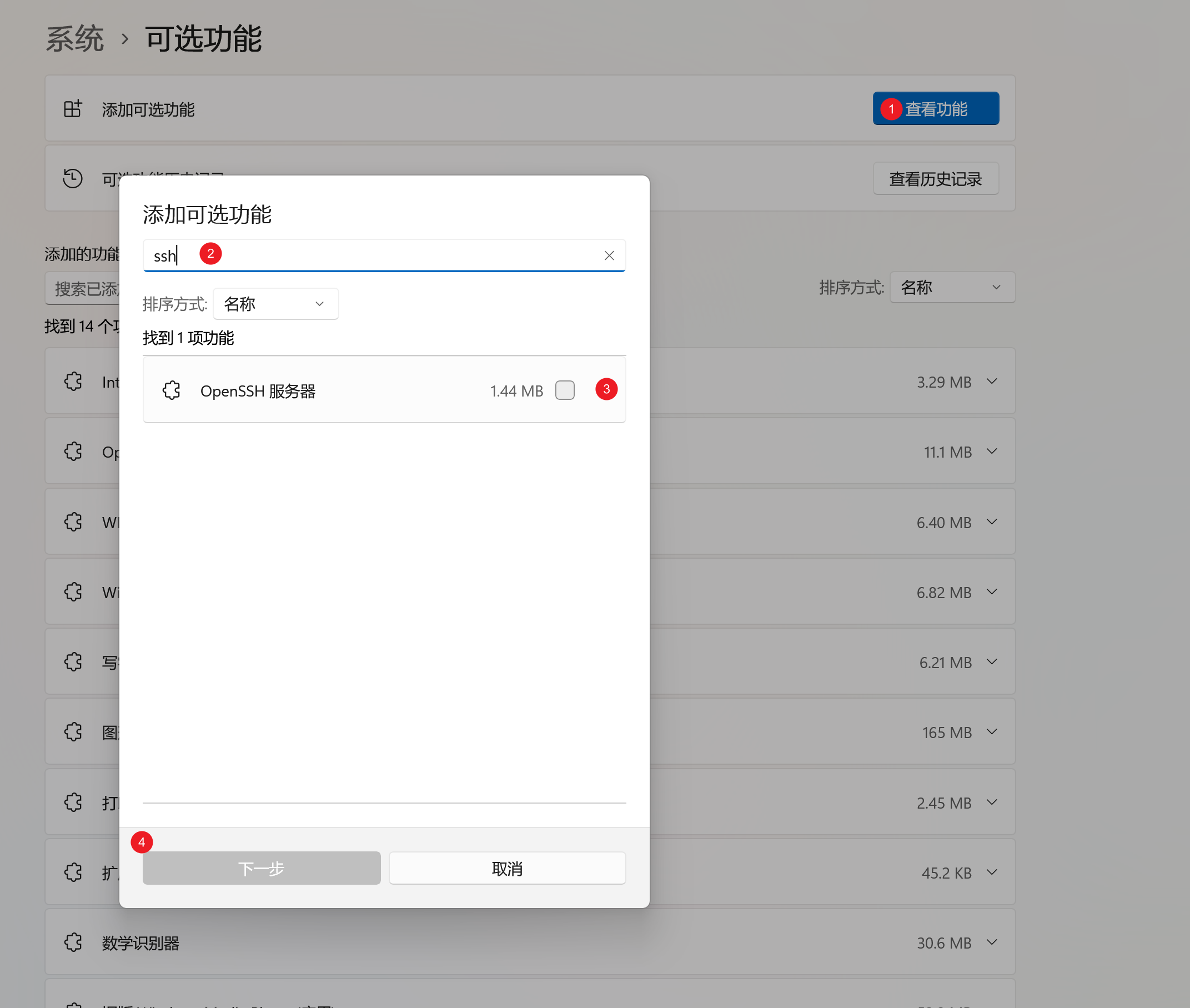
然后启动sshd服务,并设置为自动启动,并检查防火墙设置:
# Start the sshd service
Start-Service sshd
# 设置为开机自启动
Set-Service -Name sshd -StartupType 'Automatic'
# 检查防火墙设置
if (!(Get-NetFirewallRule -Name "OpenSSH-Server-In-TCP" -ErrorAction SilentlyContinue | Select-Object Name, Enabled)) {
    Write-Output "Firewall Rule 'OpenSSH-Server-In-TCP' does not exist, creating it..."
    New-NetFirewallRule -Name 'OpenSSH-Server-In-TCP' -DisplayName 'OpenSSH Server (sshd)' -Enabled True -Direction Inbound -Protocol TCP -Action Allow -LocalPort 22
} else {
    Write-Output "Firewall rule 'OpenSSH-Server-In-TCP' has been created and exists."
}
如果 sshd_config 里修改了端口,比如:
Port 2222
则防火墙规则也要放开对应端口,远程连接时使用:
$port = 2222
New-NetFirewallRule `
  -DisplayName "Allow SSH $port" `
  -Direction Inbound `
  -Protocol TCP `
  -LocalPort $port `
  -Action Allow
远程连接时使用:
ssh -p 2222 arloor@windows-ip
设置默认登录 shell 为 PowerShell 7
Windows OpenSSH 的默认 shell 通过注册表设置:
HKLM:\SOFTWARE\OpenSSH
推荐安装 PowerShell 7 的 MSI 版,这样 pwsh.exe 会在稳定路径:
C:\Program Files\PowerShell\7\pwsh.exe
安装 MSI 版 PowerShell 7:
winget install `
  --id Microsoft.PowerShell `
  --source winget `
  --installer-type wix `
  --scope machine `
  --architecture x64 `
  --silent `
  --force `
  --accept-package-agreements `
  --accept-source-agreements `
  --disable-interactivity
设置 OpenSSH 默认 shell:
New-ItemProperty `
  -Path "HKLM:\SOFTWARE\OpenSSH" `
  -Name DefaultShell `
  -Value "C:\Program Files\PowerShell\7\pwsh.exe" `
  -PropertyType String `
  -Force

Restart-Service sshd
查看当前默认 shell:
Get-ItemPropertyValue -LiteralPath "HKLM:\SOFTWARE\OpenSSH" -Name DefaultShell
验证 ssh 登录后确实进入 PowerShell 7:
ssh -p 2222 arloor@windows-ip '$PSVersionTable.PSVersion.ToString(); $PSHOME; whoami'
如果只想使用 Windows 自带的 Windows PowerShell 5.1,也可以把 DefaultShell 设为:
C:\Windows\System32\WindowsPowerShell\v1.0\powershell.exe
配置sshd_config,位置在 %programdata%\ssh\sshd_config,参考文档:OpenSSH Server configuration for Windows Server and Windows,主要修改下面两个配置:就是强制使用公钥登录
PubkeyAuthentication yes
PasswordAuthentication no
然后重启sshd服务,让配置生效。
在windows上保存公钥: 如果是系统管理员账户(一般第一个账户都是系统管理员账户),则在 %programdata%/ssh/administrators_authorized_keys 中保存公钥,如果是普通用户,则在 %userprofile%/.ssh/authorized_keys 中保存公钥。
排查 Permission denied
远程登录时报:
Permission denied (publickey,keyboard-interactive).
先看 OpenSSH 事件日志:
Get-WinEvent -LogName OpenSSH/Operational -MaxEvents 30 |
  Select-Object TimeCreated,Message |
  Format-List
如果日志里有类似:
User arloor not allowed because shell c:\program files\powershell\7\pwsh.exe does not exist
说明不是公钥本身的问题,而是 DefaultShell 指向的 shell 路径不存在。检查并修复:
Test-Path -LiteralPath "C:\Program Files\PowerShell\7\pwsh.exe"

Set-ItemProperty `
  -LiteralPath "HKLM:\SOFTWARE\OpenSSH" `
  -Name DefaultShell `
  -Value "C:\Program Files\PowerShell\7\pwsh.exe"

Restart-Service sshd
本机回环测试:
ssh -p 2222 `
  -o BatchMode=yes `
  -o StrictHostKeyChecking=no `
  arloor@127.0.0.1 `
  '$PSVersionTable.PSVersion.ToString(); $PSHOME; whoami'
设置powershell默认http代理
# 确保允许执行脚本
Set-ExecutionPolicy RemoteSigned -Scope CurrentUser
# 按需创建powershell的profile文件
if (-not (Test-Path -Path $PROFILE)) {
    New-Item -Path $PROFILE -Type File -Force
    Write-Output "Profile 文件已创建: $PROFILE"
} else {
    Write-Output "Profile 文件已存在: $PROFILE"
}

@"
# 设置系统代理
`$proxy = "http://127.0.0.1:7890"  # 你的代理地址和端口
`$env:HTTP_PROXY = `$proxy
`$env:HTTPS_PROXY = `$proxy

# 可选:输出代理状态
Write-Output "HTTP_PROXY is set to `$env:HTTP_PROXY"
"@ | Out-File -FilePath $PROFILE -Encoding UTF8 -Force

# 或者用:Add-Content -Path $PROFILE -Encoding UTF8
# 这个是追加
最后C:\Users\arloor\Documents\WindowsPowerShell\Microsoft.PowerShell_profile.ps1内容是:
# 设置系统代理
$proxy = "http://127.0.0.1:7890"  # 你的代理地址和端口
$env:HTTP_PROXY = $proxy
$env:HTTPS_PROXY = $proxy

# 可选:输出代理状态
Write-Output "HTTP_PROXY is set to $env:HTTP_PROXY"
说明:
-
Here-String (
@"... "@)- 使用
@"和"@包裹多行字符串,内容会原样输出。 - 在 PowerShell 中,变量名前的 ```(反引号)用于转义特殊字符。
- 使用
-
Out-File- 将内容写入指定文件路径。
- 参数:
-FilePath:指定目标文件路径。-Encoding UTF8:使用 UTF-8 编码写入文件。-Force:覆盖已有内容。
-
Test-Path和New-Item- 确保文件存在。如果文件不存在,就先创建空文件。
远程关闭windows
ssh上去后执行 shutdown /s /f /t 0